
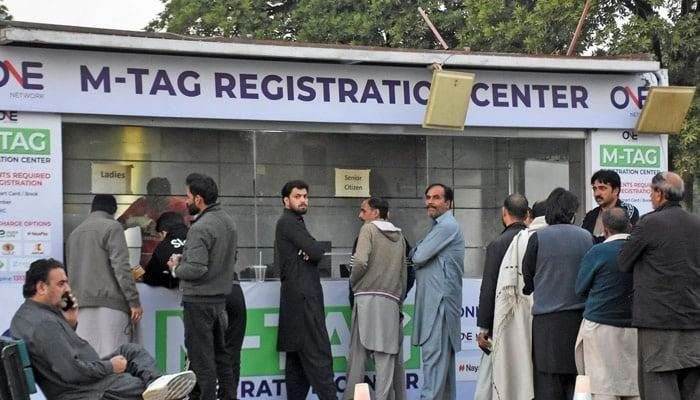

M Tag has become an essential part of the modern toll collection system in Pakistan, especially for those who frequently travel on motorways. The M Tag allows smooth and automated toll payments, reducing delays and making the entire process more efficient for both drivers and authorities. This blog will guide you on how to check your M Tag ID, register for an M Tag online, recharge it, and keep track of its balance—all the essentials you need for a hassle-free experience on the road.
What is an M Tag?
An M Tag is a small electronic tag attached to your vehicle that allows for automated toll collection as you pass through toll plazas on motorways. It is part of the Electronic Toll Collection (ETC) system designed to make highway travel more convenient by eliminating the need for manual payments at toll booths. With an M Tag, the toll is automatically deducted from your prepaid balance, ensuring a smoother journey without having to stop and pay at each toll plaza.
How to Check M Tag ID
Checking your M Tag ID is a straightforward process and can be done using various methods. Here’s a step-by-step guide to checking your M Tag ID:
- Using the M Tag Portal:
The easiest way to check your M Tag ID is by visiting the official M Tag website. You can log in to your account and check all the details related to your M Tag, including its ID. - M Tag App:
If you have the M Tag app installed on your phone, you can simply open the app, log in, and view your M Tag details, including the ID. - SMS Service:
In some cases, you can also check your M Tag ID via an SMS service provided by the relevant authorities. You can send a specific keyword to the designated helpline number to receive your M Tag ID. - Customer Support:
If you are unable to find your M Tag ID online, you can always contact the M Tag helpline number. The customer support team will assist you with retrieving your M Tag ID.
How to Register M Tag Online
Getting your M Tag registered online in Pakistan is now easier than ever. Here’s a simple process for registering your M Tag:
- Visit the Official M Tag Website:
Go to the official M Tag registration portal to begin the process. The website will have an option for registration. - Provide Required Information:
During registration, you will need to provide some personal and vehicle details, such as your CNIC number, vehicle registration number, and contact information. - Select a Payment Method:
After filling out the required information, you will need to make a payment for the M Tag. You can choose from various payment methods available, including online banking or payment via mobile wallets. - Receive Your M Tag:
Once your registration is complete, you will receive your M Tag ID. It will either be sent to you by mail or you may be asked to pick it up from the nearest M Tag center. - Activate Your M Tag:
After receiving your M Tag, follow the instructions to activate it. This may involve linking your M Tag to your vehicle and ensuring that it is working properly.
How to Recharge M Tag Online
Recharging your M Tag online is a quick and convenient way to ensure your toll payments are always up to date. Here’s how you can recharge your M Tag online:
- Login to Your M Tag Account:
The first step is to log in to your M Tag account on the official website or app. - Select Recharge Option:
Once logged in, look for the recharge or payment option. You will be given the option to recharge your M Tag using various methods, including bank transfers, credit/debit cards, or mobile wallet payments. - Choose the Amount:
Select the amount you wish to add to your M Tag account. The amount will be used for toll payments across the motorways. - Complete the Payment:
After selecting the recharge amount, follow the steps to complete the payment securely. - Confirmation:
After the transaction is successful, you will receive a confirmation message or notification. Your M Tag account will now be recharged, and you’re all set for future toll payments.
How to Check M Tag Balance
It’s essential to keep track of your M Tag balance to avoid running out of funds during your travels. Here are a few ways to check your M Tag balance:
- Check Through M Tag Portal:
Log in to your M Tag account on the official website. You will find your current balance displayed on your account dashboard. - M Tag App:
The M Tag app also shows the balance of your account. You can easily view it by opening the app and checking the relevant section. - SMS Service:
If you prefer checking your balance through SMS, you can send a predefined keyword to the M Tag helpline number. You will receive an instant response with your current balance. - M Tag Helpline Number:
You can always contact the M Tag helpline number for assistance. The customer service team can provide you with up-to-date information regarding your balance and help with any other queries.
M Tag Helpline Number
If you ever encounter any issues with your M Tag, or if you need further assistance regarding registration, balance, recharge, or any other aspect, the M Tag helpline number is available for support. The helpline number allows you to speak with a customer service representative who can guide you through the process and resolve any issues you may face.
Importance of M Tag Registration Online
M Tag registration online has made the process of obtaining an M Tag easier and more accessible for everyone. No longer do you need to physically visit M Tag offices or wait in long queues. Instead, you can complete the entire registration process from the comfort of your home.
Some of the key benefits of online M Tag registration include:
- Time-Saving: You can complete the process quickly, without the need to visit a registration center.
- Convenience: Registering online means you can do everything at your own pace, anytime, anywhere.
- Immediate Activation: Once registered, your M Tag is activated instantly, and you can start using it right away.
Tips for Using M Tag
- Ensure Proper Attachment: Make sure that your M Tag is properly attached to the vehicle’s windshield to avoid any reading issues at toll booths.
- Check Balance Regularly: Keep an eye on your M Tag balance to avoid running out of funds while traveling.
- Recharge in Advance: Recharging your M Tag before a long trip ensures that you won’t face any inconvenience while on the road.
- Stay Updated on Toll Rates: Stay informed about any changes in toll rates or policies to avoid surprises when traveling.
Conclusion
The M Tag system in Pakistan offers a more streamlined and efficient way to travel on motorways. Whether you’re looking to check your M Tag ID, register for an M Tag online, recharge it, or check your balance, the process has become user-friendly and accessible to all. With the help of the M Tag app, website, and helpline, you can stay on top of your M Tag needs with ease.
By following the simple steps outlined above, you can ensure a smooth and hassle-free journey every time you hit the road. Be sure to check your M Tag ID, keep your balance in check, and recharge your M Tag online to make your travel experience as efficient as possible. For more information, visit Pak net.